How Long Is 5 Miles Driving? Accurate Times and Practical Tips
How long is 5 miles driving? It depends mostly on the roads and speed.
At 60 mph, it takes about 5 minutes to cover 5 miles without stops. Slower city driving or traffic can double or triple that time.
Driving 5 miles in busy city streets often means stoplights and signs slow you down. A steady 25 mph pace stretches the trip to around 12 minutes. Traffic jams or road work can add even more time.
Highway driving tends to be faster since there are fewer stops and more consistent speeds. On the other hand, rural or winding roads might slow you down below 35 mph. These changes impact your total travel time.
Planning your route ahead helps. Checking traffic and road types can save you time.
Driving 5 miles can run from 5 to 12 minutes or more depending on conditions. So plan for some extra time.
Key Takeaways
- Driving 5 miles normally takes 5 minutes at 60 mph without stops.
- City driving at 25 mph usually averages about 12 minutes for 5 miles.
- Stoplights, traffic, and road types can extend your driving time significantly.
- Estimating trip time without considering stops often leads to underestimating.
- Checking traffic updates before you start helps avoid unexpected delays.
- Use average city or highway speeds to calculate rough time estimates.
How Long Does It Take to Drive 5 Miles?
Driving 5 miles typically takes between 4 and 12 minutes, depending on your speed. City driving often means slower speeds, while highways allow faster travel. Knowing your average speed helps you plan better for short trips.
Speeds vary a lot depending on where you drive. In a city, you might average 25 mph, making a 5-mile drive about 12 minutes. On highways with speed limits near 65 mph, travel takes about 5 minutes.
You can cover the same distance quickly at this speed. This is common on many highways. Below is a table showing typical driving times at common average speeds.
| Average Speed (mph) | Time to Drive 5 Miles (minutes) |
|---|---|
| 25 | 12 |
| 35 | 9 |
| 45 | 7 |
| 55 | 5 |
| 65 | 5 |
| 70 | 4 |
| 75 | 4 |
| 80 | 4 |
The time decreases as your speed increases, but only up to a point. On highways, going 65 mph versus 80 mph saves about one minute for 5 miles. The time difference is small.
Both speeds cover the distance fast. City traffic often keeps speeds well below highway limits. Driving 5 miles in 7 minutes means averaging near 40 mph.
This speed is usual in suburban or mixed areas. It’s slower than highway speeds.
Use these times as a base, then add extra minutes for stops or slowdowns. For local roads with stops, plan for about 12 minutes to drive 5 miles. Stop signs and traffic slow you down.
It takes longer than highway driving. On highways with minimal stops, 5 minutes is a reasonable estimate. This helps you set realistic expectations for errands or commutes spanning about 5 miles.
How Road Types Affect Driving Time for 5 Miles
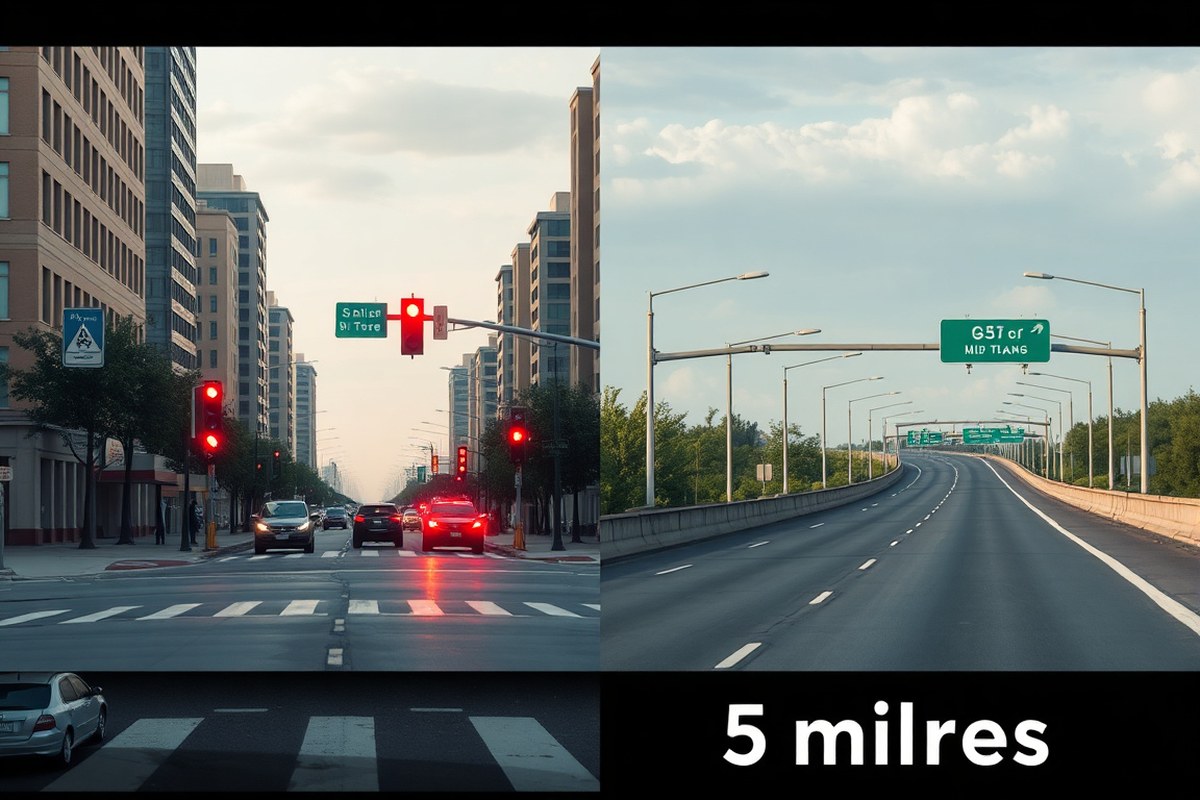
Driving 5 miles on a highway or interstate usually takes about 5 to 9 minutes. These roads usually have speed limits around 60 to 65 mph. They let you drive faster without many stops.
That helps you cover more ground quicker. The steady speed and fewer traffic signals make highways the quickest choice for short-distance driving.
Driving 5 miles on city streets often takes about 12 to 24 minutes. Traffic, signals, and stops cause these delays. It’s much slower than on faster roads.
City streets usually have speed limits near 25 to 35 mph. There are also many stoplights and stop signs.
These slow you down a lot. These interruptions significantly slow down your trip compared to highways.
Rural roads fall somewhere in between depending on the speed limits and road conditions. They often range from 35 to 55 mph but may have curves, hills, or slower zones. A 5-mile drive on rural roads typically takes 7 to 10 minutes.
More traffic or rough roads will make the trip longer. So expect some extra time then.
You should add extra time for city driving during rush hours. Traffic jams can easily double your 5-mile drive time. Plan ahead to avoid stress.
Factors That Cause Variations in 5-Mile Drive Time
Traffic greatly changes how long a 5-mile drive takes. You might expect a 10-minute drive at 30 miles per hour. But if cars are packed, your speed drops.
Stop signs, traffic lights, and intersections slow you down further. Each stop adds extra minutes, especially on busy streets or in city areas.
Rush hour makes short trips feel longer. During these times, workplaces and schools start or end their day. Roads are crowded from about 7 to 9 a.m. And 4 to 6 p.m. This pushes your average speed below normal.
A trip that normally takes 10 minutes can last 20 or more. Traffic makes the time go up. It all depends on how bad the congestion gets.
Weather also plays a role in your driving time. Rain, snow, fog, or ice can reduce your speed significantly. Drivers often slow to keep control and stay safe.
For example, wet roads may lower speed by 10 to 20 miles per hour. Visibility problems like fog force slower driving too, causing delays on your 5-mile route.
How to Calculate Driving Time for 5 Miles
You can find the time to drive 5 miles by dividing distance by speed. Divide 5 miles by your average speed in mph. That gives you the driving time in hours.
This tells you the time in hours, which you then convert into minutes. Knowing this helps you plan your trip better and avoid surprises.
Formula for Driving Time Calculation
To calculate driving time, divide the distance by speed. The formula looks like this: Time = Distance ÷ Speed
Distance is in miles, and speed is in miles per hour (mph). Time you get is in hours from the division. Using consistent units gives accurate results.
Multiply the time in hours by 60 to convert to minutes. There are 60 minutes in one hour. This helps if you want time in minutes instead.
Example: Calculating Time at 30, 50, and 70 Mph
Say you want to find the drive time for 5 miles at three speeds. You can calculate each time separately for different average speeds.
This helps compare how speed affects travel time. Use the formula for each speed.
- Divide 5 miles by 30 mph to get 0.1667 hours.
- Multiply 0.1667 by 60 to convert it to minutes. Result: 10 minutes.
- Divide 5 miles by 50 mph to get 0.1 hours.
- Multiply 0.1 by 60 to get 6 minutes.
- Divide 5 miles by 70 mph to get about 0.0714 hours.
- Multiply 0.0714 by 60 to get about 4.3 minutes.
At 30 mph, your 5-mile drive takes about 10 minutes. At 50 mph, it takes 6 minutes.
At 70 mph, it only takes 4 minutes. These examples show how speed changes your travel time quickly.
Using Online Miles to Time Calculators Effectively
Online calculators make this math easy and fast. You just enter your trip distance and your estimated average speed.
Choose speed carefully. Freeway speeds might be 60-65 mph, but city driving is slower. These calculators give time estimates based purely on those numbers, ignoring extra stops or traffic.
To get the best estimate, use your usual average speed or the speed limit. To check your real driving time, use a GPS or odometer.
These tools measure distance and time during your trip. They give you more exact driving times than estimates.
Using Miles to Time Calculators for Accurate Estimates
Miles to time calculators help you estimate how long a drive will take. They convert distance into time based on your average speed. Using these tools correctly makes your travel plans more realistic and less stressful.
Choosing the Right Calculator Inputs
You need to enter your driving speed to get a good estimate. Most calculators let you set speeds in miles per hour. City driving averages about 25 mph, while highways may allow 55 mph or higher.
Setting realistic speeds matters because it affects total time directly. When you hit traffic or slow zones, reduce your speed input as needed. This adjustment keeps your estimates closer to real conditions.
- Set your average speed based on the type of road
- Use 25 mph for city center driving without stops
- Increase speed for highways, often 55 mph or more
- Consider slower speeds if traffic or construction is likely
- Avoid guessing; check speed limits or recent drive times
This approach helps you avoid surprises about your arrival time. Entering wrong speeds could skew your estimate by several minutes.
Adding Breaks and Stops
Most drivers need breaks for safety and comfort, especially on longer drives. Our calculator suggests taking these pauses by dividing total drive time by two. For example, a 30-minute trip should include at least one break.
Make sure to add extra time if your route has many stoplights or traffic jams. These delays aren’t always built into simple calculations. Planning for 1 to 3 minutes per stoplight helps you get closer to actual travel time.
Remember to add extra minutes for red lights and heavy traffic when planning your trip.
Including stop times in your calculations prevents underestimating your total trip length. It also avoids stress from rushing or missing appointments.
Understanding Limitations of Calculators
Calculators offer estimates, not exact times. They don’t always include unexpected delays like accidents or weather issues. Estimations work best as a starting point, not a final schedule.
Most miles to time calculators assume constant speeds without sudden stops. Your route goes through busy urban areas, so expect some delays. It’s wise to cross-check estimates with real traffic data or apps for better accuracy.
Use calculators as quick tools for planning, but stay flexible on the road. Keeping some extra time in your schedule can reduce frustration from longer drives.
Practical Tips to Plan Your 5-Mile Drive More Efficiently
Planning a 5-mile drive well helps you avoid delays and stress. Start by checking typical traffic patterns for the time you plan to drive.
That way, you can adjust your expected speed and departure time to match real conditions. Driving during peak hours slows traffic and adds extra minutes to trips.
Choosing the best route also cuts down travel time. Use an app or GPS that updates traffic data in real time. It can suggest faster alternatives around jams.
Stopping for things like coffee or dropping off takes extra time. Include that time to avoid rushing unexpectedly.
- Check traffic conditions 10 to 15 minutes before leaving.
- Use a GPS app with live traffic rerouting.
- Plan trips to avoid rush hours when possible.
- Allow 3 to 5 minutes extra if your route has several lights.
- Take a short break for safety if your driving feels tiring.
Adjust your speed estimates by multiplying your usual pace by 0.7 to 0.9 during busy periods. For example, you normally drive 30 mph. Heavy traffic slows you to 21, 27 mph.
This slows your trip significantly. This helps set realistic arrival times without frustration. Keep in mind that sudden stops or accidents can still add unexpected time.
Plan breaks under five minutes on short trips. Longer breaks add delays. Keeping it short helps stay on schedule.
Long breaks don’t work well on short drives. Only take them if you need rest before going further.
Safe driving means noticing signs of fatigue or distraction and pausing briefly when needed. These small steps make your 5-mile drive smoother and more predictable.
Common Mistakes When Estimating Short Driving Times
People often overestimate their average speed when guessing how long 5 miles takes to drive. Assuming they’ll drive 60 mph on city streets or through stoplights is common. This makes your time estimate too short and not real.
It happens especially when the average speed is near 50 mph. This does not count any stops along the way.
Ignoring stops or slowdowns can also mess up your estimate. Traffic lights, stop signs, and other pauses add extra minutes. One red light can add 30 seconds or more to your drive.
These delays add up fast on short trips. Even a single stoplight can affect your time.
Check if your estimate feels right by doing simple math. Compare your guess to known road conditions. This method helps you avoid unrealistic times.
Divide the distance by a speed close to what you expect. Use 50 mph for clear roads.
For city streets with lights, use 25 or 30 mph. Then add 1 or 2 minutes if you expect stop signs or lights.
- Don’t assume maximum highway speeds on local roads.
- Count seconds for each expected stop or red light.
- Confirm traffic flow times: rush hours take longer.
- Use a reliable average speed like 50 mph on clear roads.
- Add extra time for hills or bad weather conditions.
- Check real trip durations using a GPS or map app.
Another mistake is not adjusting for time of day. Early morning or late night often means fewer stops and faster travel. Afternoon rush hour usually slows you down, adding minutes beyond your simple estimate.
Try this quick calculation: time equals 5 miles divided by speed. Then, add 1 minute for any stops you expect. This gives a basic time estimate.
Add 2 to 3 minutes if you think traffic will be heavy. This extra time covers slowdowns and stops on your route. Your city drive time under 6 minutes is probably too optimistic.
It’s rare to make short trips that fast with traffic and lights. Expect 6 to 8 minutes in normal conditions and more if traffic is bad.
Comparing Driving, Walking, and Biking 5 Miles
Driving 5 miles usually takes around 5 to 10 minutes. Walking that same distance can take about 1 hour and 15 minutes at a comfortable pace. Biking sits in between, often taking 20 to 30 minutes depending on your speed.
Knowing these time differences helps you pick the best travel method. Walking is great exercise but slow.
Driving saves time but can be costly or stressful. Biking is quicker than walking and eco-friendly but depends on your fitness and the terrain.
| Travel Mode | Average Speed | Approximate Time for 5 Miles |
|---|---|---|
| Driving (suburban/urban) | 30-60 mph | 5-10 minutes |
| Biking (moderate pace) | 10-15 mph | 20-30 minutes |
| Walking (moderate pace) | 4 mph | 75 minutes (1 hour 15 minutes) |
You save the most time driving when your route has free-flowing traffic. Heavy stoplights or congestion can slow driving, sometimes making biking faster. Walking beats driving only during extreme traffic jams or if you want to skip parking hassles.
Biking to work or a friend’s house takes some planning. Consider road safety, bike lanes, and your stamina.
Driving becomes a better choice if you carry heavy items or travel with others. For short errands, walking might be easiest and cheapest, especially in walkable neighborhoods.
Plan your route ahead. Estimate travel time for your chosen mode, including stops or delays.
How Breaks, Stops, and Traffic Lights Impact Total Trip Time
Breaks, stops, and traffic lights often add noticeable time to a 5-mile drive. These pauses are not included in simple drive time estimates. To get a more accurate trip time, add stopped time.
Include the time waiting at stops or signals. This helps you plan better for your route.
Identify Common Causes of Stops During 5-mile Drive
Traffic lights, stop signs, and pedestrian crossings often make drivers stop. Another big cause is traffic congestion, which slows or stops cars frequently. Occasional planned stops like gas stations or pickup spots also add time.
Knowing exactly where you might stop helps you plan better trip timing. Urban routes usually have more stoplights than highways near town. Leaving at different times of day also changes how often you hit red lights.
Estimate Average Stop Duration
Stoplights usually make you wait 30 to 90 seconds each time. Stop signs often cause about a 5- to 10-second pause if the road is clear. When traffic is heavy, waiting times can grow much longer, even minutes.
Planned breaks like filling gas or quick errands take at least 5 minutes. Traffic congestion can reduce your speed by 20 to 50 percent or more. Accounting for these delays means adding several minutes to your drive estimate.
Add Stop Time to Driving Time for Total Trip Estimate
You can include stop time by adding total expected breaks to your base drive time. Start by calculating your straight driving time at an average speed. Then, add the time you expect to spend at stops or lights.
Use this step-by-step method to get a total trip duration:
- Calculate your 5-mile drive time at the average speed you’ll travel.
- Count how many stoplights, stop signs, or expected traffic delays you’ll hit.
- Estimate wait times based on common stop durations. Traffic lights usually take 30 to 90 seconds. Stop signs take about 5 to 10 seconds.
- Add any planned break times, like gas or pickups.
- Sum all estimated stop times to get your total pause duration.
- Add total stop time to your base drive time for the full trip estimate.
- Adjust your estimate based on time of day or known traffic conditions.
Many driving time tools allow adding break times separately. You can enter total break time easily. These get included in your total trip time.
This approach helps avoid underestimating how long the trip will take. Without adding stops, your trip time could fall short by several minutes, especially in busy areas.
Step-by-Step Action Plan for Estimating Your 5-Mile Drive Time
Use this plan to get clear driving time estimates for your next 5-mile trip. Follow each step and confirm the estimate fits your usual driving conditions.
- Before you start: Check your route’s speed limits and road type. Knowing this helps set a baseline speed.
- Right before your drive: Look up current traffic conditions online or on a traffic app. This shows any delays ahead.
- During your drive: Note actual time it takes to drive 5 miles. Use a stopwatch or your phone’s timer.
- Right after your drive: Compare your recorded time with calculated estimates from speed and distance. See how close they match.
- Within a week: Repeat the drive at different times or days. Check how traffic or stops change your time.
- After a month: Average your findings to get a realistic typical time for your 5-mile drives.
- Whenever planning a trip: Add extra time if you usually stop. Include delays from traffic lights or breaks too. Past drives can help you guess these delays.
- After longer periods: Update your time estimate if road conditions, construction, or traffic patterns change.
Frequently Asked Questions
How Long Does It Take to Drive 5 Miles on Average in the US?
Driving 5 miles usually takes about 10 to 15 minutes. City traffic often changes a lot.
Speed limits also vary by street. Your travel time depends on the route and conditions.
Can Weather Conditions Affect How Long It Takes to Drive 5 Miles?
Yes, bad weather like rain or snow can slow you down significantly. Slippery roads and poor visibility make you drive more cautiously, increasing travel time.
Does Driving During Rush Hour Change How Long 5 Miles Takes?
Yes, rush hour can double or triple your drive time. Heavy traffic, stop-and-go conditions, and traffic lights all slow your trip.
Are There Any Shortcuts or Routes That Typically Reduce 5-mile Drive Time?
Taking highways or major roads without traffic lights is usually faster. However, detours or construction might make them longer sometimes.
How Much Does the Type of Car Affect the Time to Drive 5 Miles?
The car type usually has little effect on such a short trip. Driving habits and traffic matter much more than the vehicle itself.
Wrapping Up
Driving 5 miles usually takes between 5 and 15 minutes, depending on speed and stops. Checking traffic right before you leave gives the best estimate. Try timing your drive next time to see your own accurate duration.